Programming: It's for Everyone!

Connor Bain
Theory Building
1 - 2 hours
Introductory Computer Science
v1

Overview

These days, we're all constantly bombarded with technological vocabulary. From "AI" to "Machine Learning" to "Neural Networks" to "block chain," we're constantly reminded of tech buzzwords. But perhaps the word we hear most these days is: "code."

What does it mean to code? What is a program? What are its parts? Are they all super complicated? Do you have to read binary?

Although more and more learners are being introduced to programming and computer science in their usual school curricula, there are still pervasive misconceptions about what it means to "code." This lesson is meant to be an introduction to programming in its most basic sense. Learners will interact with various computational tools to gradually build familiarity with both programming vocabulary and practices. While you can't become a programming expert in an hour or two, this lesson aims to prove to you that programming and computation is just another creative tool that you can use to think about the world around you.


Note: Page 5 (the last student page) is an "optional" page that you may not have time for. Feel free to come back to it at another time.

Standards

Computational Thinking in STEM
  • Computational Problem Solving Practices
    • Assessing Different Approaches/Solutions to a Problem
    • Creating Computational Abstractions
    • Developing Modular Computational Solutions
    • Computer Programming
    • Troubleshooting and Debugging
    • Preparing Problems for Computational Solutions

Activities

  • 1. Commands & Properties - Actions and States
  • 2. Parameters
  • 3. Programming Using Blocks
  • 4. Simple can be Beautiful
  • 5. Bonus: Conditionals - Making a Smarter Turtle

Student Directions and Resources


In the following pages, you'll be guided through a series of activities meant to introduce you to the basics of programming practice and vocabulary. If you've taken a computer science course, much of this may already be familiar to you! 

Here are some things you shouldn't worry about while you complete these activities:

1. Getting the "right" solution on the first try. What you should do is actively think about how your solutions change as you think about each problem differently.

2. Memorizing programming vocabulary. If this is your first time using programming parlance, don't worry about remember every particular term. We'll try to give you a broad overview of how programmers talk about things so that you can talk to your classmates and share your work with your peers.

Page 5 (the last page) is an "optional" page that you may not have time for. Feel free to come back to it at another time.

1. Commands & Properties - Actions and States


programming language is just like any other language.

English is a language made up of words and syntax (think grammar, punctuation, etc.). The combination of using words and syntax allows for us to communicate with other people who speak English! But in English, there are situations where weirdness prevents us from understanding the meaning behind a sentence. Take, for example, the sentence: "I never said they stole my money." We might assume it means a particular thing, but if you said this sentence out loud...most people would interpret the meaning based on which word you placed emphasis (which we show in bold below) on:

I never said they stole my money. — Someone else said it. 

never said they stole my money. — I didn't say it. 

I never said they stole my money. — I only implied it. 

I never said they stole my money. — I said someone did, not necessarily them. 

I never said they stole my money. — I considered it borrowed. 

I never said they stole my money. — Only that they stole money,  not necessarily my own. 

I never said they stole my money. — They stole something of mine, not my money. 

Computers can't deal (easily at least) with this ambiguity. So in a programming language, we limit ourselves to particular commands that are defined very specifically such that there is no ambiguity when you give the computer that command. Below, you'll interact with a microworld where you have the ability to ask the computer to run or process some commands.


Question 1.1

To the right, you'll see exactly what everyone expects to see on a typical day: a turtle on a chessboard (or a grid of patches) with some lava on it. Your goal? Guide the turtle to the safety of the violet (yes, that's violet not "purple") patch.

At the top of the board is a RESET button. Every time you click this button, the board will be randomly regenerated, placing the turtle, lava, and violet goal in random new locations.

At the bottom of the board you should see three buttons:

  • TURN LEFT
  • FORWARD
  • TURN RIGHT

These are the only commands that exist in your world here. Each time you click one of the buttons, the turtle executes the command. Try using those buttons to guide the turtle to the goal!


In this simulation, you only had three commands. In other words, the computer only understood these three actions of turning left, turning right, and going forward. But say we wanted the turtle to go backwards one square. Is there any way we could combine these three commands into a BACKWARDS command? In the space below, type a sequence of button presses you might use to go backwards!


Question 1.2

Surprise! You just wrote your first computer program! A program is just a collection of instructions that a computer can run. When you combined the existing commands to go BACKWARDS, you wrote a program. 


Now that you've gotten command of commands, let's turn our attention to another aspect of: properties.

Our favorite turtle is back on board! You've got all the same buttons at your disposal, but you've got some interesting monitors down at the bottom of the screen. You should see three different displays:

  • POSITION (where am i?)
  • HEADING (what direction am i facing?)
  • WHAT-IS-AHEAD (what is ahead of me?)

Each of these monitors shows the current value of a property for your turtle-buddy. Just like an object in the real world has properties (e.g. color, texture, hardness, etc.), computational objects have these properties too!

Properties are very important to understand because they can have an effect on the outcome of commands. For instance, does the FORWARD button always do the same thing? Or does it depend on what the value of HEADING is for the turtle? 

Move your turtle around and watch how the value in each of these three different properties changes as you move. Use these explorations to answer the questions below.


Where is the "origin" or position (0,0) on our board?

  top left
  bottom left
  bottom right
  top right
  center


Question 1.3

Use the table below to map the numerical HEADING value you saw during your explorations to a more understandable DIRECTION (i.e. the direction the turtle is facing) that is either North (up), South (down), East (right), or West (left). Hint: you can use the green "plus" button to add a row to the table.


Question 1.4

What does the WHAT-IS-AHEAD property read as when a turtle is facing a direction where there are no more patches in front of it?

  lava
  safe
  none
  edge


2. Parameters


Just like the value of a property might affect the outcome of a command, a parameter is a value that can be used as input to a program to change the way it behaves. Below we have our usual turtle sim, but with an important added feature, a slider at the top called NUMBER-OF-LAVA.

Use this new version of the model to answer the questions below.


Question 2.1

Try changing the NUMBER-OF-LAVA slider to a different value and then clicking the RESET button. Describe what happens.


Question 2.2

What happens if you change the NUMBER-OF-LAVA slider to a different number but don't hit the RESET button.


Question 2.3

Why does nothing happen if you change the slider but don't hit RESET:

  The program doesn't check to see if I changed the slider by itself
  The computer doesn't like me
  NUMBER-OF-LAVA is a parameter for some part of the program that is run when RESET is clicked
  There is a bug in the program


Question 2.4

What are some other elements of this simulation that could be parameterized?

Hint: What other things might a player want to customize if they can already change the number of lava patches? These don't need to be numeric.


3. Programming Using Blocks


When we construct sentences in English, we end up using quite a bit of syntax in order to make sure our meaning is communicated correctly. This often includes quite a bit of punctuation–seemingly meaningless symbols that drastically change the way we read/interpret a sentence. If you've ever seen a program in a traditional text-based programming language like Python, Java, or even something like Fortran, you're sure to have noticed the same types of things! Semicolons, indents, and parentheses are just some examples of syntax that are used in text-based programming languages to prevent ambiguities.

But today, we want to get programming right away and don't want to have to get used to using a text-based language. Instead, we're going to use a blocks-based language to program the movements of our turtle buddy! A blocks-based language is a computer programming language where programs are constructed visually, with commands "snapping" together just like pieces in a jig saw puzzle.

Below, we have our now familiar turtle simulator, but you'll notice a "Programming Canvas" to the right hand side. On the Canvas on the right-hand side you'll see the beginning of a procedure which tells our turtle how to MOVE. You'll see on the right-most side of your screen a set of 4 different blocks, three of which should remind you of the buttons we used to solve this simple puzzle just a few minutes ago.

While issuing commands one-at-a-time to our turtle was great, here we want to write our procedure using these blocks. In a way, we're basically programming the turtle's brain. We upload our program to its brain with the RUN PROGRAM button and let it do its thing. To add blocks to your TO MOVE procedure, just click and drag a block from the rightmost side of your screen and snap it, like a puzzle piece, on to the bottom of the TO MOVE block (use the little nibs on the blocks as a guide). Continue this process with whichever blocks you need to guide your turtle buddy to the safety of the violet patch. Once you've finished your program, use the RUN PROGRAM button to have the turtle run your program.

If your turtle hits the lava, it'll let you know and go back to its starting position. But if your turtle stays safe but doesn't make it to the goal, you'll need to change your program to accomdate its new position.

Note: If you try to stop your program while it is executing by clicking the RUN PROGRAM button, your turtle will likely get confused. If this happens to you, make sure to click the CLEAR TURTLE BRAIN button before trying again.


Question 3.1

How many blocks did you use in your solution?


Question 3.2

Did you use the "repeat" block? If not, see if you can write your program with fewer blocks by taking advantage of the repeat block. Using fewer blocks might make your program be more clear so that someone else could have an easier time reading your code.

Hint: You can use repeat to loop a command (or a sequence of commands) a certain number of times. Once you've added a loop to your program, you can then snap blocks into the loop. Anything within that block will be repeated the number of times you specify.

How many blocks did you save by including the repeat block?


Question 3.3

Imagine we were to click the RESET button and generate a new board. Would your program still work as a solution to the maze? Why or why not?


4. Simple can be Beautiful


Now that you're experts, lets put your skills to some creative use. We have our delightful turtle buddy and some simple ways of controlling its movement. We also now know how to chain these movements (or commands) together into programs. But programs don't need to always be about completing some sort of task. What if we used our turtle buddy to create art? Computers are great at performing the same simple tasks repeatedly at amazing speed. Here, we're going to use a slightly modified version of our previous activity that focuses on drawing designs based off of your turtle buddy's movements.

There are a few main changes to this simulation:

1. We no longer have a checker-board grid. The patches are still there, they're just all the same color.

2. Your turtle buddy now has a pen with it and where it moves, the pen draws on the ground (you'll see what we mean). The color of the pen depends on the color of your turtle's shell.

3. The FORWARD, LEFT TURN, and RIGHT TURN command blocks are a little different than they were before. You'll notice each of them has now been parameterized. FORWARD now asks you how many steps that your turtle should step forward while LEFT TURN and RIGHT TURN ask you how many degrees to turn. Note that this is NOT the same thing as "changing the value of heading to right or left." Instead, it's turning at an angle. You'll see what we mean if you ask your turtle to LEFT TURN 90 degrees. If you were to ask it to LEFT TURN 90 four times....that's the same thing as LEFT TURNING 360...which is the same thing as not turning at all!

4. Oh, and we removed the lava...and the violet goal patch. Now you're free to draw to your heart's content!

5.  TO MOVE, has been replaced by TO DRAW. Unlike TO MOVE that only gets executed by your turtle buddy once, TO DRAW will be repeatedly executed by your turtle until you click the DRAW button once more to stop it.

You control the movement of your turtle just as before, by connecting movement blocks to each other and then, once satisfied, hitting the DRAW button (note: remember, once you've clicked the DRAW button, your turtle will keep following your program until you click DRAW again).

Use the simulation to answer the questions below. 


Question 4.1

Write a program that results in your turtle drawing an equilateral triangle (equal angles and equal side lengths). Explain how your program works below.


Question 4.2

Now modify your program so that it draws a square. Explain your modifications.


Question 4.3

Now try modifying your program to draw a regular (all sides are equal length) pentagon. Is there a pattern between your solutions for a regular triangle, regular square, and regular pentagon? Explain.


Question 4.4

This process of looking for patterns among tasks is very common in programming. In this case, we might be able to abstract our programs into a single program that can draw any regular polygon with a given number of sides n

Say you want to draw a regular polygon with n sides. While we know we'll need to have at least n forward commands, how might we express the turn angle of our turtle in terms of n?

(Hint: Think back to your geometry days. Maybe the term interior angle might remind you of something?)


Question 4.5

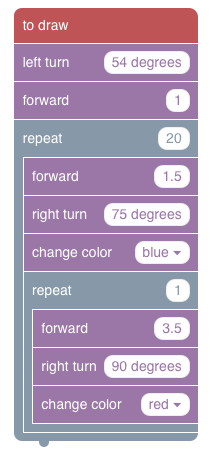
Spend some time experimenting. See what sort of designs you can have your turtle buddy draw! If you're not feeling particularly creative, try recreating this program:

Spend as much time as you'd like experimenting. Once you've found a design and program you're proud of, take a screenshot of your design and program and upload it below. (The next page is a bonus page, so only continue if you still have time remaining)

Upload files that are less than 5MB in size.
File Delete
Upload files to the space allocated by your teacher.


5. Bonus: Conditionals - Making a Smarter Turtle


If you still have time, let's cover one more concept: conditionals.

conditional is basically the computational equivalent of an "if - then" statement. For instance, if there's a chair beneath me, then I can take a seat. Conditionals are very powerful in programming because they allow us to perform different actions based on some condition.

Before, our amazing-turtle-saving-maze-program only applied to a single map at a time because we were just analyzing the situation ourselves and giving our turtle buddy explicit directions. What if our turtle buddy could do that sort of analysis by itself? Could we write an program that could solve any map?

Below you'll see our familiar turtle maze, complete with a Programming Canvas to the right with some additional blocks. The additional blocks are:

if patch-ahead: this block is a conditional that allows your turtle to check for one of four conditions. Is this patch ahead the goal? lava? safe? or an edge? This block will execute commands inside of it only if the condition is met.

maybe: this is a different type of conditional that depends on random chance. Your turtle will randomly choose to follow the commands inside of this block according to the probability you select.

randomly pick: this is yet another conditional that you might think of as an if-else statement. Your turtle will basically flip a coin. If heads, it will do the first thing. Otherwise, it will do the second thing.

Like our drawing turtle, your turtle will continuously run "to move" function you provide it until it meets an untimely doom or reaches the safety of the violet patch..

Using the provided blocks, try and come up with a to move program that can solve ANY of the mazes you throw at it. If your program successfully solves one puzzle, hit RESET and then run your program again.


Question 5.1

Is it possible to get a generalized solution without using one of the "chance" blocks (e.g. randomly pick and maybe)? Why or why not?


Question 5.2

How did you go about writing your program? Trial and error? Did you plan it out first? Describe your process.


Question 5.3

While our turtle buddy being able to make a decision based on the patch ahead is a big step in the right direction, what other sort of "knowledge" do you think woul be nice for the turtle to be able to have to make a decision on where and how to move?


Question 5.4

Reflect on what you've done in the past hour or so. Did you learn something new about programming? What was most difficult? What came most easily?